
Combinatorial Logic and the PLC Program
Let’s start with a few basic concepts that explain how a PLC program works.
Once you understand the PLC scan time, you can examine how the PLC program works. Combinatorial logic explains how logic combines true and false, its two states. Combining logic is also the basis of PLC programming. Since the two share the same fundamentals, combinatorial logic gives you a useful starting point for learning to program a PLC.
Input logic
A PLC program has two parts, with the first controlling or deciding the second. We call the first part the input logic. The input logic is the function of the PLC program. Its name describes its job: it contains the logic of your program. To understand this first part, we need to understand what logic means, since the program itself is logic. More precisely, a PLC program uses digital logic, known in mathematics as boolean algebra.
Boolean algebra, or digital logic, allows only two states: true and false. A PLC represents false with 0 and true with 1. Microprocessors and computers also work this way. Their operations use 0’s and 1’s, so our thinking when programming a PLC needs to use 0’s and 1’s too. This is why we use boolean algebra and logic to program the PLC. We are describing the program in the same terms the PLC uses to work.
Logic with a real-world example
A real-world example will help explain how digital logic works.
For this example, we will use a light bulb and two switches. Both kinds of component have two states: the light bulb can be on or off, and so can each switch.
Changing the connections between the switches and the light bulb changes how they function together.
First, we can connect the switches and light bulb in one straight line, running from the line to the neutral. We call this a series connection:
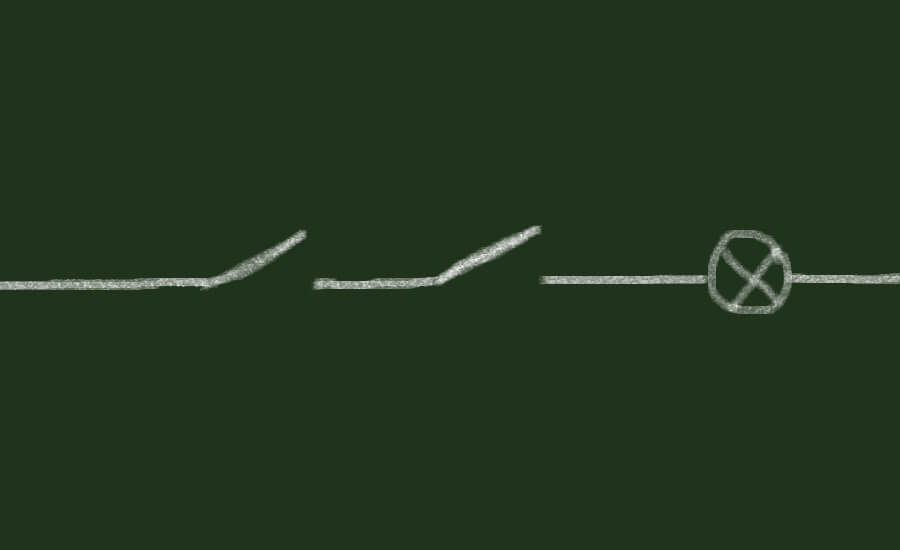
With the switches connected in series before the light bulb, both must be on for the bulb to light. Digital logic calls this an AND-gate because the first switch AND the second switch must be on. Our switches and bulb use the states on and off; digital logic uses true and false. Think of each switch and the light bulb as showing a true or false state. An on switch is true, and an off switch is false. The same applies to the bulb: when it is on, it is true; when it is off, it is false.
Combinatorial logic and the six gates
Returning to the AND-gate, its two inputs determine the state of an output. We call this combinatorial logic because it combines multiple inputs, or variables in boolean algebra.
AND-gate
Every gate in combinatorial logic has inputs and outputs, and the inputs determine the output state. Both inputs of an AND-gate must be true for its output to be true. In our example, the two switches are the inputs and the light bulb is the output. Combinatorial logic decides the output state immediately. As soon as the inputs are present, the gate sets the output to match them. In our real-world example, this means turning on both switches turns on the light bulb.
We can draw the AND-gate using this symbol:
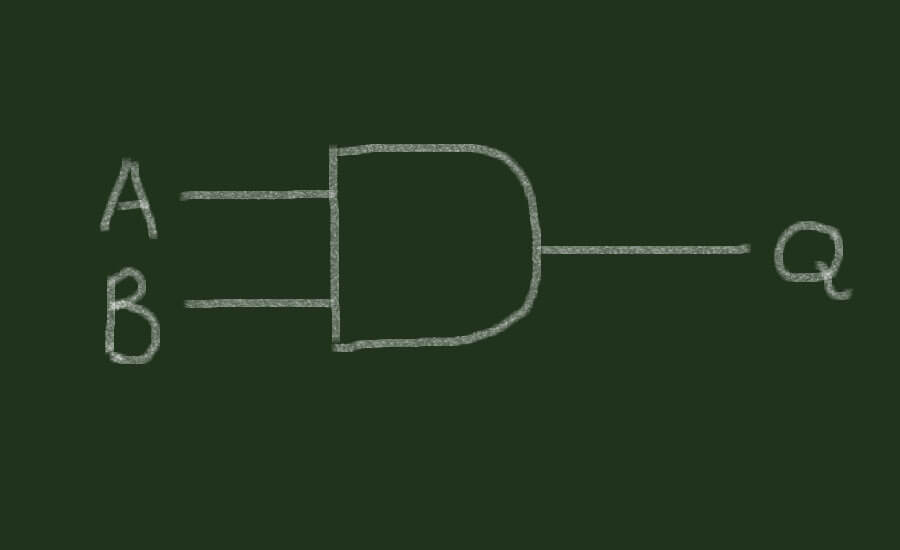
Digital logic usually labels the inputs A and B and the output Q. The gates we will use here all have two inputs and one output. Each performs a simple function that sets its output state. Some gates can take more than two inputs, even though the gates we are working with here use two. All gates still have only one output, whose state is set by the function of that gate.
A truth table shows the states of the inputs and outputs. We can draw a truth table for each combinatorial logic gate to describe how it works.
For the AND-gate, the truth table looks like this:
| A • B | A | ||
| false | true | ||
| B | false | false | false |
| true | false | true | |
This truth table shows the output state for every possible combination of inputs, describing how the gate functions.
The large field at the upper left contains the AND-gate formula. We can write the AND-gate (A and B) as AB, A^B or A • B.
The fields with thick outlines show the AND-gate’s output results, labelled Q. Below A and beside B, the two fields give the values of inputs A and B. These values can be false or true. To make them easier to work with, we can use 0’s and 1’s instead. Most PLC’s describe input and output status with 0 for false and 1 for true.
This table compares the names and terminology used in our real-world example, combinatorial logic, digital logic and PLC electronics:
| Light switches | Combinatorial logic | PLC program logic | PLC electronics |
| off | false | 0 | 0 volt |
| on | true | 1 | 5 volt |
Here is the AND-gate truth table again, using 0’s and 1’s for the input and output states:
| A • B | A | ||
| 0 | 1 | ||
| B | 0 | 0 | 0 |
| 1 | 0 | 1 | |
Q is 1 (true) only when both A and B are 1 (true).
Although this AND-gate has only two inputs and one output, it is a simple PLC program. Imagine A and B as PLC inputs and Q as a PLC output. A PLC program consists of one or more logic gates, as we will see in the next chapter when we begin programming PLC’s. For now, the point to understand is that a PLC program is a piece of logic, just like this AND-gate. The gate takes the states of its inputs and uses them to decide the output state. In the PLC program, those input states likewise provide the decisions for setting the output.
More logic gates
OR-gate
Combinatorial logic includes other gates besides the AND-gate. In our light bulb example, we can connect the two switches in “parallel” before the light bulbs. This arrangement changes how the switches work. Here is the schematic for the “parallel” connection:
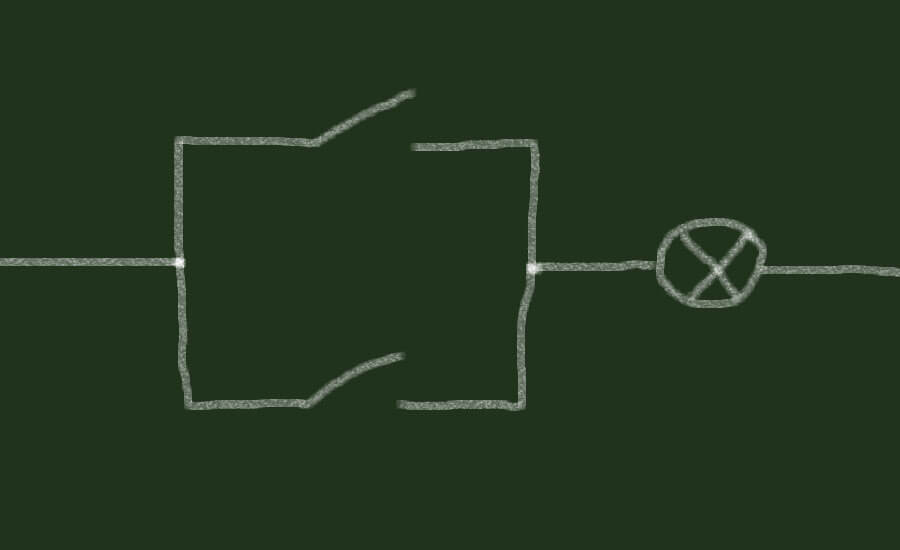
We call this a parallel connection because the switches sit parallel to each other. Unlike the series connection, each switch now has a direct connection to the light bulb and can turn it on. We no longer need both switches to be on at once. To turn on the bulb, the first switch OR the second switch has to be on. This relationship between the switch states and the bulb state describes the OR-gate’s function.
Here is the symbol for an OR-gate:
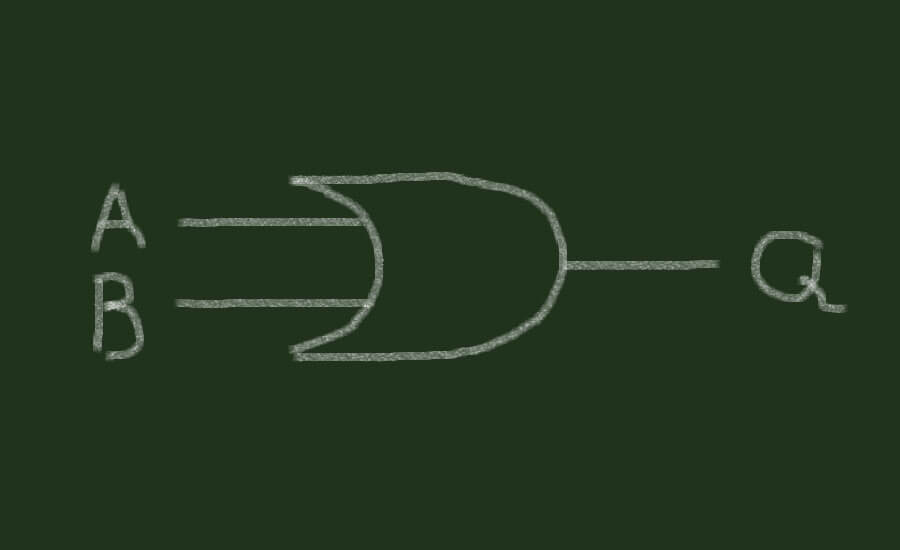
Like the AND-gate, an OR-gate has two inputs and one output. We label the inputs A and B and the output Q.
Because the OR-gate works differently from the AND-gate, it needs a different truth table:
| A + B | A | ||
| 0 | 1 | ||
| B | 0 | 0 | 1 |
| 1 | 1 | 1 | |
The fields with thick outlines show that the OR-gate output is 1 (true) when either A or B is 1 (true).
We write the OR-gate formula as A + B or A∨B.
The AND-gate and OR-gate are simple logic gates that we can explain using two switches and a light bulb. The switches stand for inputs A and B, while the light bulb stands for output Q.
NOT-gate – The inverter
There are 5 gates to learn in combinatorial logic, leaving three to cover. Next is the NOT-gate. Together, the AND-gate, OR-gate and NOT-gate form the basic gates of combinatorial logic. We can derive the other two from them, but first we will examine the NOT-gate:

A NOT-gate is unusual because its output is the same as its input, inverted to the opposite state. This gives the gate its name: when the input is true, the “output” is NOT true; it is false.
We also call the NOT-gate an inverter because it takes input A and inverts its value to the opposite state. Its truth table illustrates this and looks slightly different from the previous two tables:
| A | A |
| 0 | 1 |
| 1 | 0 |
The first column below A shows the input (A) states; the second column below A shows the NOT-gate’s “output” values. Since the input and output are the same, we cannot really talk about an output in the way we did with the previous gates. In this sense, the NOT-gate is not really a gate: it makes no decisions based on inputs. Its function is only to change the value of one input.
We can write the NOT-gate formula as A, A’, ¬A and sometimes NOT A or !A.
Derived logic gates
We can derive the last two gates from the three we have covered. These are more complicated to explain with our switches and light bulb, so we need to extend the switches’ functions. The next two gates work differently from the first two, so the simple arrangement with just two switches is no longer enough to illustrate their function. We need the switches to do more than they did in the earlier example. This becomes clearer when we examine the next gate, the XOR-gate.
XOR-gate
The XOR-gate is also called the exclusive OR-gate. It works much like the OR-gate, with one difference: two true inputs give a true output in an OR-gate, but a false output in an XOR-gate.
Start with the XOR-gate truth table:
| A ⊕ B | A | ||
| 0 | 1 | ||
| B | 0 | 0 | 1 |
| 1 | 1 | 0 | |
The underlined 0 at the lower right marks the difference between the OR-gate and the XOR-gate.
We write the XOR-gate formula as A ⊕ B.
Before returning to the real-world example, we can build an XOR-gate from the three basic gates in combinatorial logic. Both of the last two gates, including the XOR-gate, can be derived from these basic three gates.
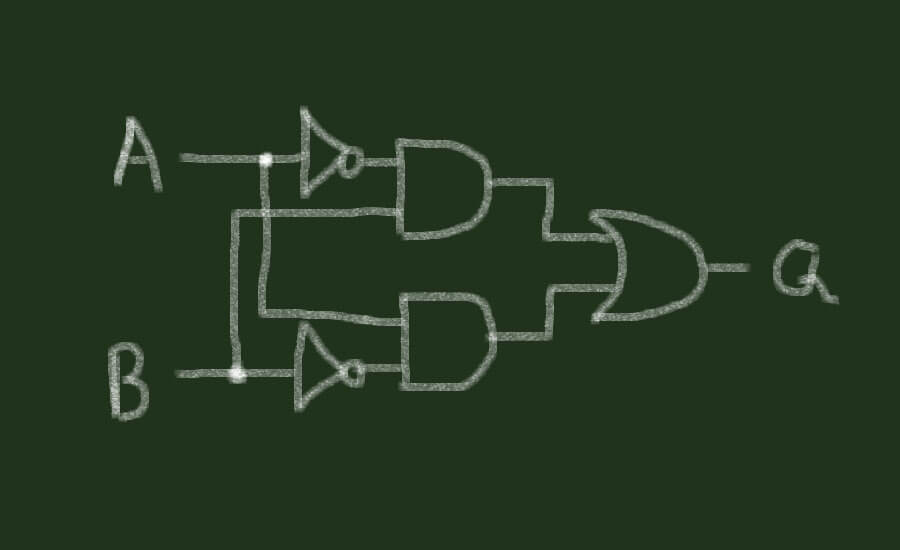
To build an XOR-gate, we use two NOT-gates, two AND-gates and one OR-gate:
Together, these five gates work like an XOR-gate. The output is 1 (true) when either A or B is 1 (true), but not when both inputs are 1 (true).
Normally open and normally closed
We can now return to the real-world example and extend what our two switches can do.
A switch can make a connection or break one. These functions are called normally open and normally closed, according to the default state of the switch contacts. A contact that is “open” by default and makes no connection is normally open, also called a NO-contact. We draw it like this:

A normally closed contact makes a connection in its default state. Here is the symbol for the normally closed contact, or NC-contact:

One switch can have several contacts. A common arrangement has two, with one normally open and the other normally closed. The switch can then make one connection and break another.
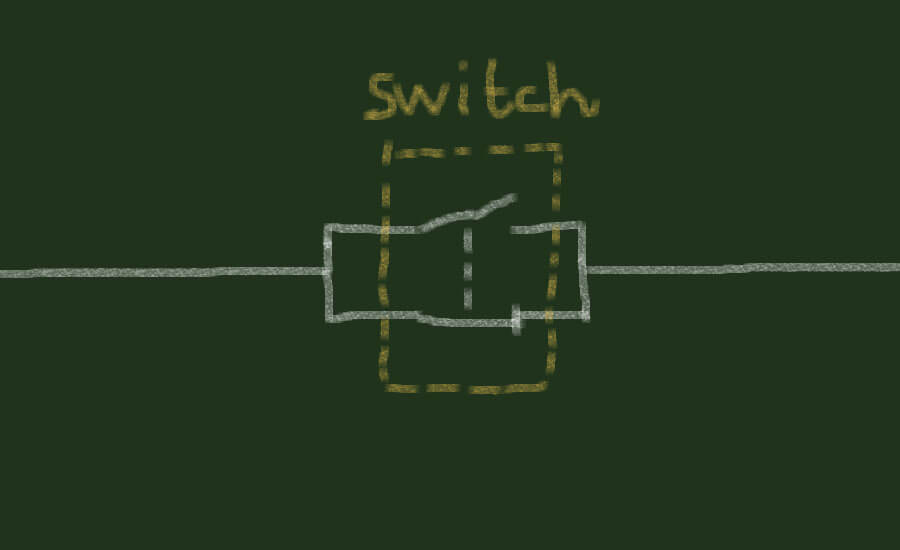
Activating the switch above makes a connection at the NO-contact and breaks the connection at the NC-contact. All contacts inside the switch activate at the same time.
We used normally open switch contacts to illustrate the OR-gate and AND-gate, so activating a switch made a connection. For the XOR-gate example, we also need NC-contacts. These invert the signal like a NOT-gate.
Like a NOT-gate, an NC-contact inverts the input signal. Its truth table makes this relationship clearer:
| NC – IN | NC – OUT |
| OFF – 0 _.__._ | ON – 1 |
| ON – 1 _./ ._ | OFF – 0 |
This table matches the NOT-gate truth table. When the NC-contact is off, in its default state, it makes a connection and its output is on or 1 (true). When activated, in the state true or 1, its output becomes 0 or false. The normally closed contact therefore does the same job as a NOT-gate. In each case, the signal is inverted to the opposite state: an off input gives an on output, while activating the input changes the output to off.
We can use these three rules:
- Serial contacts are the same as AND-gates.
- Parallel contacts are the same as OR-gates.
- NC-contacts are the same as NOT-gates.
To connect our switches and light bulb as an XOR-gate, we can start with the OR-gate connections:
These connections work for the OR-gate, but the XOR-gate needs a different result when both contacts activate. The OR-gate lights the bulb in that state; the XOR-gate must keep it off. Our XOR-gate circuit therefore needs to prevent the bulb from lighting when both contacts activate.
The OR-gate uses a parallel circuit. Let’s add a normally closed contact to one switch and consider where it can connect to that circuit. First, we can put it parallel to the other two contacts:

That connection would leave the light bulb on all the time, so it does not give us the result we need. Here is its truth table:
| Switches A and B | A | ||
| OFF | ON | ||
| B | OFF | ON | ON |
| ON | ON | ON | |
The bulb stays on whether the switches are on or off.
Since this arrangement did not work, let’s connect the new NC-contact another way:
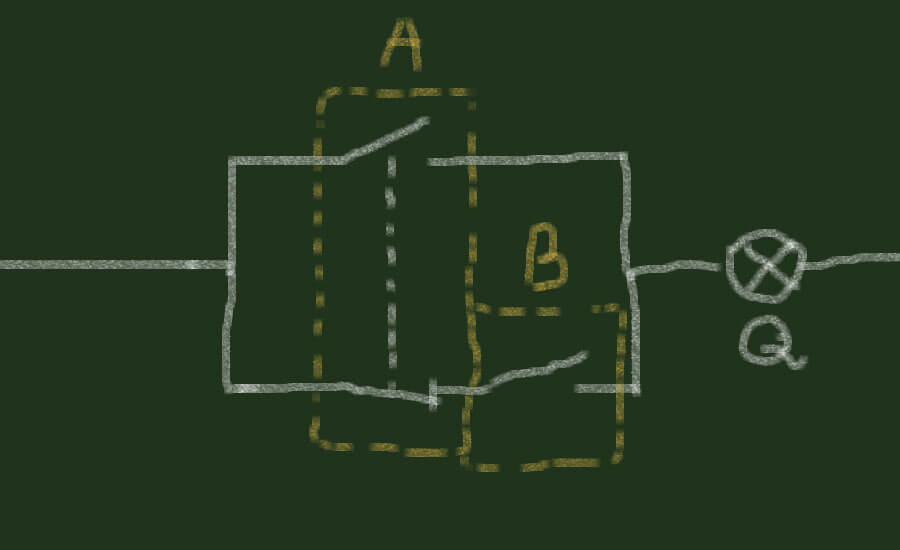
The first switch now has two contacts and two functions: making a connection and breaking one. The truth table shows that the new circuit between the switch contacts and bulb works like the OR-gate:
| Switches A and B | A | ||
| OFF | ON | ||
| B | OFF | OFF | ON |
| ON | ON | ON | |
Adding this NC-contact has not changed the result. Next, we can give both switches two functions by using both their normally open and normally closed contacts.
This time, we will apply the three rules above. They help us choose among the many ways of connecting the contacts and light bulb. There are many possible connections we could try, and we could guess at an arrangement until we found one that makes an XOR-gate. Using the rules gives us a way to work through the connections instead. It should take less time to derive the XOR-gate this way.
We already have an OR-gate through the parallel connection of normally open contacts, so we can apply the first rule. Our normally open contacts already form the parallel connection we need for this OR-gate. However, its output must be NOT true when both switches, our inputs, activate. Looking at that condition suggests we need some NOT-gates to change the result. The second rule tells us that normally closed contacts act like NOT-gates, so we need to add NC-contacts to our example.
Since the light bulb must stay off when both switches activate, we might add a normally closed contact from each switch.
Our circuit currently forms an OR-gate. To get the result we want, we need to break both connections to the light bulb when both switches activate. Breaking just one connection would leave the other available. Since an OR-gate is true if even one input is true, both paths to the light bulb have to be broken. To do this, we can connect each normally closed switch contact in series with the normally open contact of the other switch:
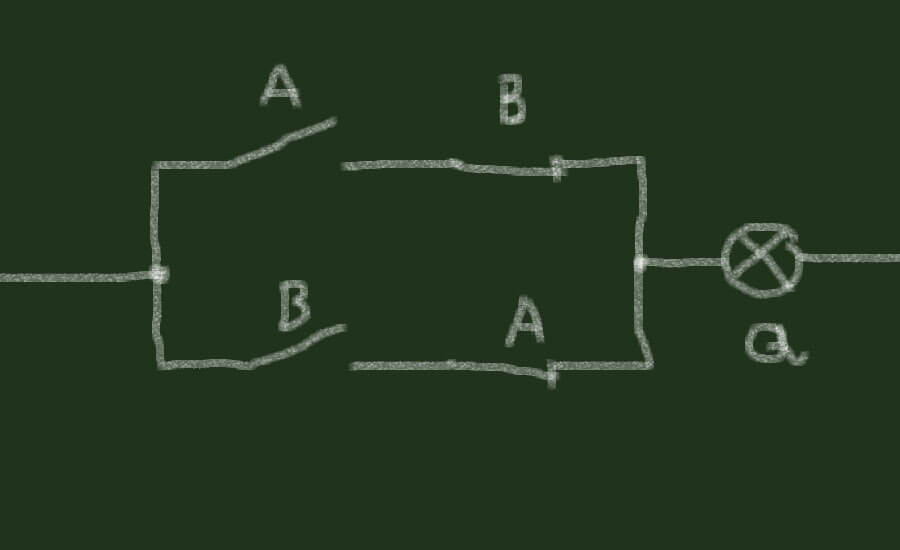
The circuit’s truth table now shows an XOR-gate. It works like the OR-gate except that, when both switches activate, the light bulb will not activate.
| A ⊕ B | A | ||
| 0 | 1 | ||
| B | 0 | 0 | 1 |
| 1 | 1 | 0 | |
We have covered four gates, leaving two. Each is the opposite, or inverted version, of one of the first two gates: the same input states give the opposite output value. They are the NOR-gate and the NAND-gate.
NOR-gate
The NOR-gate is the opposite of the OR-gate, and the NAND-gate is the opposite of the AND-gate. The “N” in each name stands for NOT, giving us NOT OR-gate and NOT AND-gate.
The NOR-gate truth table shows the inverted OR-gate:
| A NOR B | A | ||
| 0 | 1 | ||
| B | 0 | 1 | 0 |
| 1 | 0 | 0 | |
Every output state marked with a thick outline is the opposite of its OR-gate equivalent. This explains the name NOT OR-gate and how we derive it from the three basic gates. To derive the NOR-gate, we use the OR-gate together with a NOT-gate. The OR-gate works as before, but the NOT-gate inverts its output. The resulting output is the opposite of the OR-gate’s output, giving us the inverted OR-gate that we call a NOR-gate.

We use the same principle to derive the last of the six combinatorial logic gates, the NAND-gate.
NAND-gate
A NAND-gate is the opposite of an AND-gate, also called the NOT AND-gate. As with the NOR-gate, we combine an AND-gate with a NOT-gate. The NOT-gate inverts the AND-gate output to give its opposite, the NAND-gate.
We can illustrate both NAND-gates and NOR-gates in our real-world example, with the switches as inputs and the light bulb as the output. Their truth tables help us choose the connections.
The NAND-gate has this truth table:
| A NAND B | A | ||
| 0 | 1 | ||
| B | 0 | 1 | 1 |
| 1 | 1 | 0 | |
The table gives an output of 1 (true) except when both inputs are 1 (true). Even with both inputs at 0 (false), the output is 1 (true). This tells us to use normally closed (NC) switch contacts, which turn the bulb on (true) when the switches are off (false).
This takes us to a more advanced point in combinatorial logic, or boolean algebra. Our rule that a parallel connection is an OR-gate holds only when the inputs are not inverted. To illustrate a NAND-gate with our switches, we connect them in parallel:
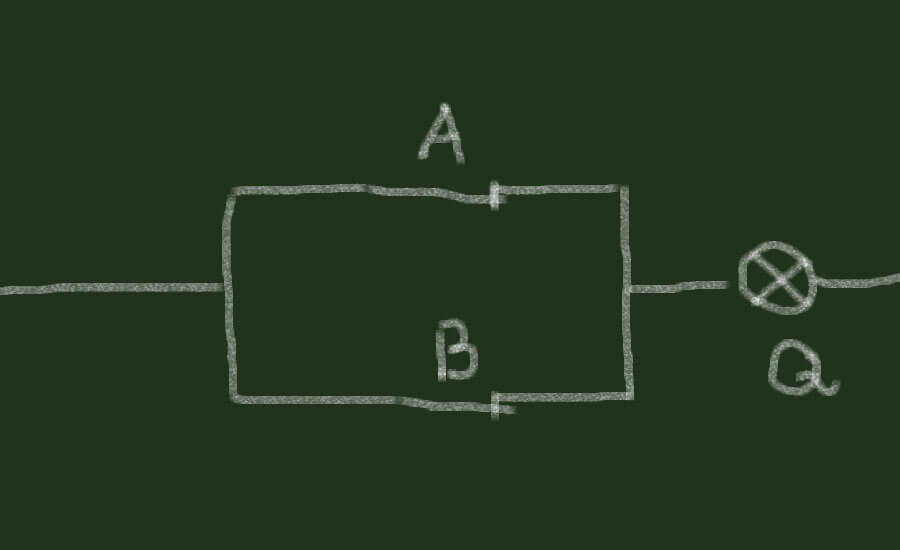
Inverting the inputs by using normally closed contacts instead of normally open ones makes this parallel connection a NAND-gate. DeMorgan’s Theorem describes what happens when we invert the inputs.
DeMorgan’s Theorem also applies to our NOR-gate example. Here, the two switches connect in series before the bulb, using normally closed contacts because the gate is inverted. This qualifies our earlier rule about series connections being AND-gates: it holds for normally open contacts. That rule describes series connections only when their contacts are normally open. Using normally closed contacts shows that the inputs are inverted. In that arrangement, the series connection gives us the NOR-gate instead.
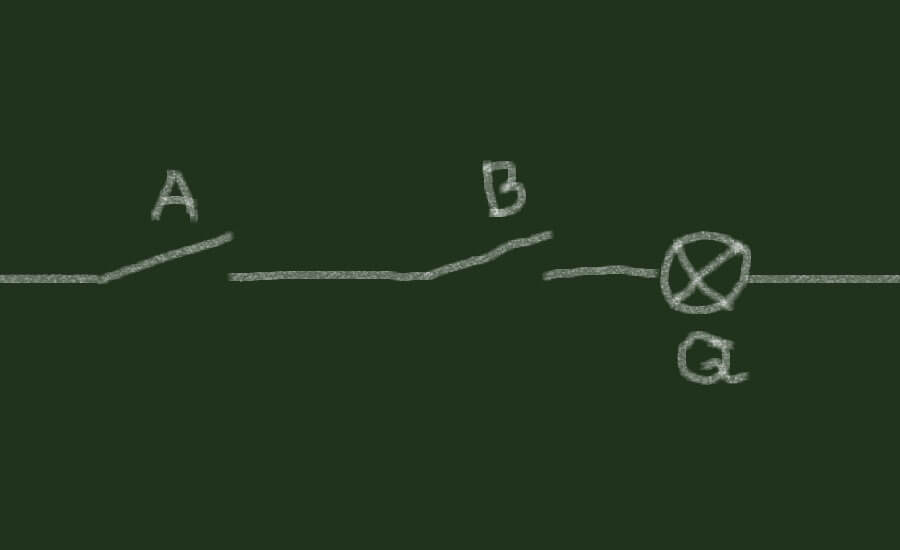
In our example, the easiest way to derive NOR-gates and NAND-gates is to invert the inputs by using normally closed contacts. When we derived these gates from the basic gates, however, we inverted the output instead of the inputs.
We can try deriving the NOR-gate by inverting the OR-gate inputs:
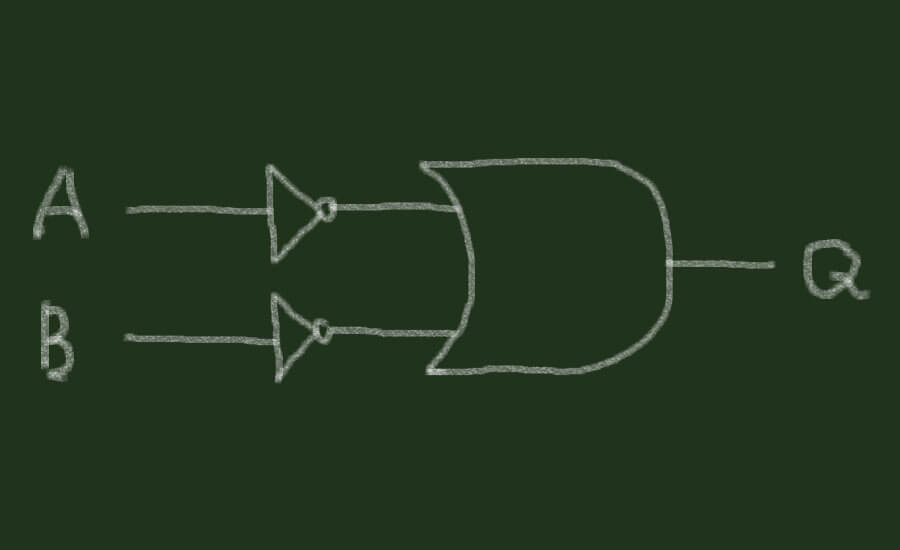
The resulting truth table would match an OR-gate with its output inverted. Inverting the input signals of an AND-gate to make a NAND-gate would give the same result. From these observations we can make another rule:
Inverting the inputs or inverting the output has the same effect on the functionality.
At last, let us try to invert the outputs in our real-world example and see if we can illustrate the NAND-gate and the NOR-gate. In our example the light bulb is representing the output. This means that we would have to invert the function of the light bulb. But how?
We can use relays. A relay contains a set of contacts in a small enclosure and activates electrically, like the light bulb. Activating the relay also activates all its contacts. Like our switches, a relay has contacts that activate together. The difference is how we operate them. Rather than moving the switch manually, we use electricity to activate the relay and all the contacts it contains.
Replacing the light bulb with a relay lets us invert the output. The output now activates the relay:

We still need the bulb, so we connect it to one of the relay contacts and use the relay to activate it. To make the bulb respond in the opposite way, we use a normally closed relay contact. This inverts the output and the bulb’s response:

Inverting the output of a parallel connection this way gives us a NAND-gate. We can also invert the output of the series connection with a relay to get a NOR-gate.
We have now illustrated all six gates in combinatorial logic:
- AND-gate
- OR-gate
- NOT-gate
- XOR-gate
- NAND-gate
- NOR-gate
Understanding gates and digital logic helps you learn PLC programming.
For practice building logic circuits, you can use these two resources:
- You can use The Logic Lab to simulate all the gates with inputs and outputs.
- You can also download Logisim, a logic circuit simulator used by universities and students for education.


Sir,
Very Informative article for beginner